Job Setup
Inviting Candidates
Invitations are how you notify candidates that they can complete their AI screening interview. ScoutUp supports both SMS and email invitations, each with customisable templates.
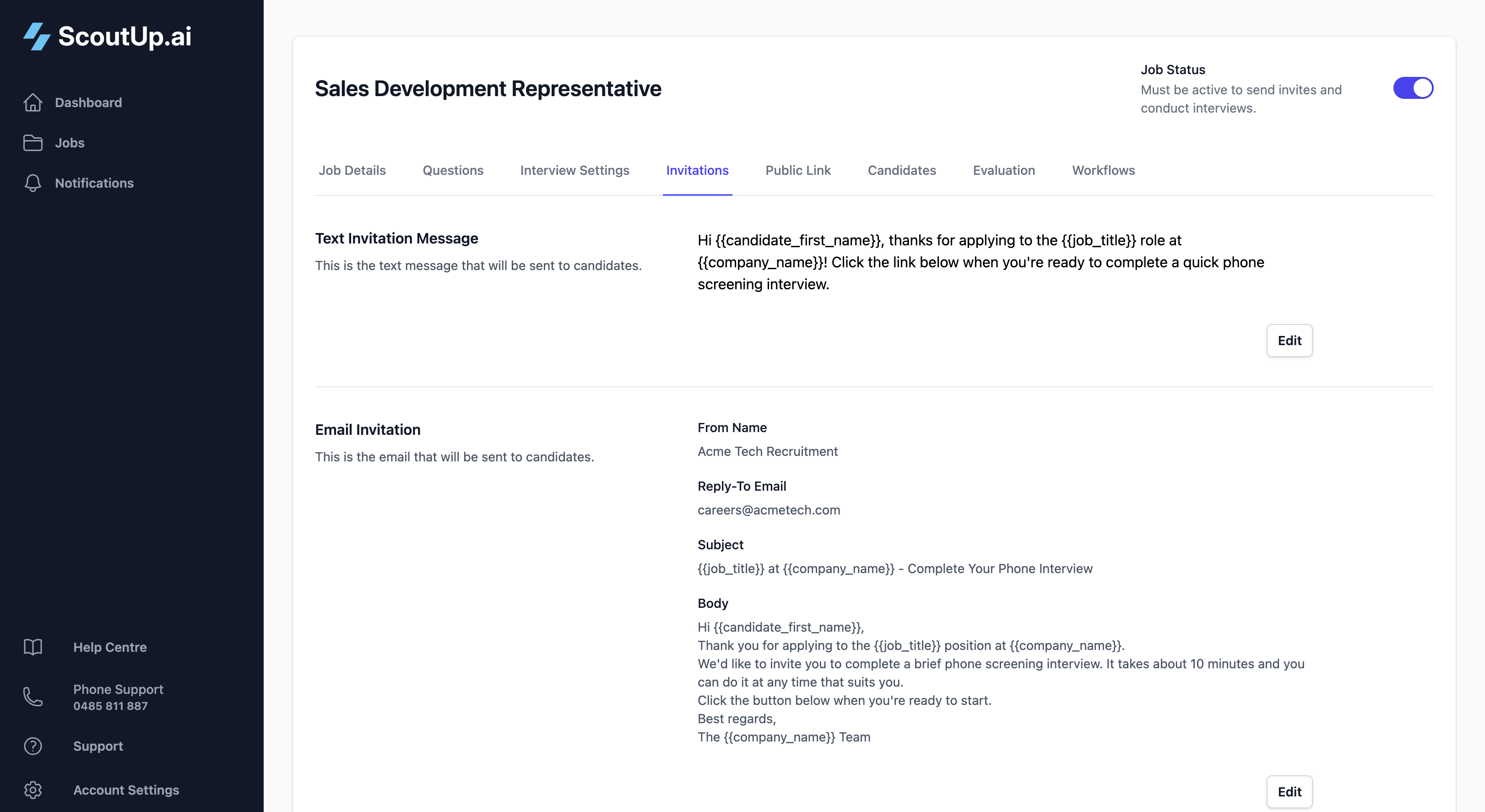
SMS Invitations
SMS invitations are short text messages that include a link for candidates to start their interview. They're ideal for quick, high-open-rate communications.
Writing Effective SMS
Keep your SMS short and clear. The interview link is automatically appended, so focus on:
- Who is contacting them (your company name)
- What it's about (the job they applied for)
- What to expect (a screening interview)
Example:
Hi {{candidate_first_name}}, thanks for applying to the {{job_title}} role at {{company_name}}! When you're ready, click the link below to complete a quick 10-minute screening interview.
Available Placeholders
Use these placeholders to personalise your messages. They'll be replaced with actual values when sent:
| Placeholder | Replaced With |
|---|---|
| {{candidate_first_name}} | Candidate's first name |
| {{candidate_last_name}} | Candidate's last name |
| {{job_title}} | The job title |
| {{company_name}} | Your company name |
Email Invitations
Email invitations allow for more detailed communication and are great when you want to provide context about the role or process.
Email Fields
From Name
The sender name that appears in the candidate's inbox (e.g., "Acme Recruitment Team" or "Jane from Acme Inc").
Reply-To Email
Where replies go if a candidate responds to the email. This should be a monitored inbox.
Subject Line
The email subject. Keep it clear and relevant. You can use placeholders here too.
Example: {{job_title}} at {{company_name}} - Complete Your Phone Interview
Email Body
The main content of your email. Include:
- A friendly greeting
- Confirmation of what they applied for
- What the interview involves
- How long it will take
- A clear call to action
The same placeholders available for SMS work in email templates.
Sending Invitations
Individual Invitations
To invite a single candidate:
- Go to the Candidates tab
- Find the candidate you want to invite
- Click the dropdown menu (three dots) on their row
- Select Send Text Invite or Send Email Invite
Bulk Invitations
To invite multiple candidates at once:
- Select candidates using the checkboxes
- Click Send Text Invites or Send Email Invites from the bulk actions bar
Automatic Invitations via Workflows
For fully automated hiring, use Workflows to send invitations when conditions are met. For example:
- When a candidate applies and their resume passes evaluation → send SMS invite
- When a candidate is synced from JobAdder → send email invite
Requirements for Sending
| Requirement | SMS | |
|---|---|---|
| Job must be Active | ✓ (except test candidates) | ✓ (except test candidates) |
| Valid phone number | ✓ Required | Not needed |
| Email address | Not needed | ✓ Required |
Tip: Test candidates can receive invitations even when the job is inactive. Use this to test your interview flow before going live.
What Candidates Receive
The Interview Link
Both SMS and email invitations include a unique link for each candidate. When they click it, they're taken to a page where they can:
- See information about the role
- Start the interview when they're ready
- Receive a call from the AI interviewer
Resending Invitations
You can send additional invitations to the same candidate if needed. The link remains the same, so if they've already completed the interview, they can use it to retake it.
Tips for Better Invitations
- Be timely: Send invitations soon after application while candidates are still engaged
- Set expectations: Tell them how long the interview takes (typically 10-15 minutes)
- Be professional: Your invitation is the first impression of your company
- Use both channels: SMS has higher open rates, but email provides more context
- Test first: Create a test candidate and send yourself an invitation to see exactly what candidates receive